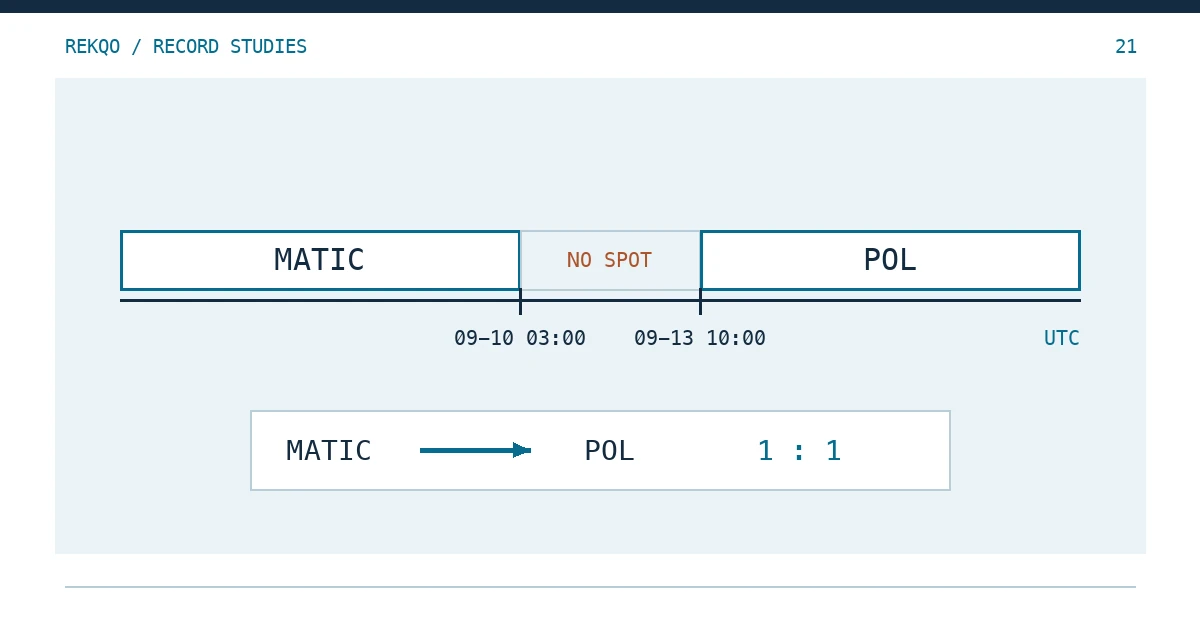
Group a crypto ledger by ticker and the Polygon token splits in two. MATIC carries a balance up to early September 2024 and then just stops; POL turns up with an opening amount that came from nowhere. Nothing is missing and nothing was gained. The asset changed its code, and the ledger has not yet been told that the two codes are one holding.
The repair is small. Leave the downloaded files exactly as they are. Keep one mapping table that records the old code, the new code, the conversion ratio, the effective time and where you read it. In your working ledger, add a “normalised ticker” column and post a pair of bridge entries at the moment of the swap. Quantities below are an illustration; dates and ratios come from the published announcements.
Why the same coins appear under two tickers after MATIC became POL
A ticker is a label that an exchange or wallet puts on an asset. Binance’s announcement “Binance Will Support the Polygon (MATIC) Token Swap to Polygon (POL)”, published on 2024-08-28, says MATIC tokens will assume the ticker of POL on Binance and that all MATIC will be swapped at 1 MATIC = 1 POL.
A later line in the same notice is the one that breaks reconciliations. From 2024-09-04 12:00 to 2024-09-10 03:30 (UTC), deposits and withdrawals of Polygon PoS native tokens (POL) kept the MATIC ticker within Binance. For those five and a half days, POL arrived on-chain and was logged as MATIC.
Wallets behave the same way. Polygon’s developer page “Migrate to POL” explains that MATIC held on the Polygon PoS chain converts to POL automatically at 1:1, yet a wallet may keep showing “MATIC” until the currency symbol is changed in its network settings. Labels follow the display, not the asset.
What to copy from a token swap announcement into your mapping table
Write one row per asset, with enough detail that you will not need to reopen the announcement next spring. For this swap the row looks like this:
| Field | Entry for MATIC → POL | Where it is stated |
|---|---|---|
| Old → new ticker | MATIC → POL | “Token Swap” section |
| Ratio | 1 MATIC = 1 POL | “Token Swap” section |
| Old spot pairs stop | 2024-09-10 03:00; open orders cancelled | Opening lines and “Spot” |
| Old deposits/withdrawals suspended | 2024-09-10 03:30 | “Deposits and Withdrawals” |
| New spot pairs open | 2024-09-13 10:00 | Opening lines |
| Transition labelling | 09-04 12:00 to 09-10 03:30: POL deposits/withdrawals recorded as MATIC | Last point under “Deposits and Withdrawals” |
| Source and check date | Announcement link, published 2024-08-28, month you opened it | Page header |
Pick one time zone for the whole table. The English notice gives UTC (03:00), while the Chinese edition states the same moment as 11:00 in UTC+8. Mix the two and the last MATIC trades before midnight can slide into the wrong month; the date-shift problem is covered in CSV Dates a Day Apart? Check the Time Zone First.
Do not fill the ratio cell with 1:1 by habit. It is 1:1 here because the announcement says so. For any other rename, take the ratio from that event’s own notice, and if you cannot find it, mark the cell “unverified” rather than inferring it from prices.
Should you find-and-replace MATIC with POL in old exports?
No. The CSV and the statement are your evidence. Once every “MATIC” has been overwritten, you can no longer tell what a row originally said, and a fresh download will not line up with your copy. Keep the originals read-only and work in a separate file, the same rule as in Binance CSV Problems After Opening a Spreadsheet.
In the working ledger, keep two columns side by side. Original ticker is copied from the file: the 2024-09-06 deposit says MATIC, so it stays MATIC. Normalised ticker is looked up in the mapping table, which gives POL for both sides of the swap. Totals, pivots and month-end balances run on the normalised column; when you need to trace a row, you search the original files by the original code. If a later export of the same period happens to use the other label, nothing in the ledger needs to change, provided both labels are in the table.
Posting the swap so the balance carries over
Illustration: just before 2024-09-10 03:00 UTC, account A holds 962.40 MATIC on spot. Part of that is the 150.00 deposited on 2024-09-06, which arrived on-chain as POL but was logged by Binance, and by the ledger, as MATIC.
The announcement gives the delisting and reopening times, not the exact moment the swapped balance was credited. The illustration places the bridge at 09-10 03:00, when the old pairs stopped; if your records show a more precise time, use it and note the evidence.
The bridge is a pair of lines:
| Time (UTC) | Original ticker | Normalised ticker | Quantity | Type |
|---|---|---|---|---|
| 2024-09-10 03:00 | MATIC | POL | −962.40 | Ticker swap (not a trade) |
| 2024-09-10 03:00 | POL | POL | +962.40 | Ticker swap (not a trade) |
No price, no proceeds, no purchase. Labelling the type keeps a year-end summary from reading this as a sale and a buy. The only test is arithmetic: the old ticker’s balance before the bridge, multiplied by the ratio, equals the new ticker’s balance after it. Grouped by the normalised ticker, the two lines cancel and the balance line runs straight through.
Whether your export contains a platform-generated line at that moment depends on which record you downloaded; the announcement does not cover it. If such a line exists, pair it with your bridge and note the file name and row number. If not, the bridge entries are the explanation, sourced to the mapping row.
When a ratio is not 1:1, multiply the old quantity by the ratio, keep the asset’s usual decimal places, and post any rounding residue on its own line rather than folding it into another trade.
No trades between the delisting and the new pairs: is something missing?
Probably not. The MATIC spot pairs stopped at 09-10 03:00 and the POL pairs opened at 09-13 10:00. For roughly three days there was simply nothing to trade, so an empty Trade History for that stretch is expected.
Orders still open when trading stopped were cancelled automatically. They sit in Order History as cancelled and never reach Trade History, so they change no balance. If an order was partly filled first, book the filled part and ignore the remainder, as in One Binance Spot Order, Several Fills: How to Record Partial Fills.
The notice also covers COIN-M futures: after settlement, MATIC balances in COIN-M wallets moved to the Spot Wallet, or to the Cross Margin Wallet for Portfolio Margin accounts. If your month-end check covers spot only, that transfer looks like money from nowhere. Settle which accounts are in scope first; see Define Your Binance Month-End Account Scope.
Balance off from the swap week onward: what to check first
Run the day-by-day comparison from Balance Doesn’t Match? Find the Day the Difference Started. If the first differing day falls between 2024-09-04 and 09-13, look at the mapping before you look at trades:
- Is only half of the bridge there, with MATIC closed out but POL never opened, or the reverse?
- Were deposits after 09-04 entered as MATIC with the normalised column left blank?
- Is one summary grouped by original ticker and another by normalised ticker? The typical symptom is one figure too high and another too low by exactly the same amount.
- Does one sheet use UTC and another UTC+8, pushing the bridge and the last MATIC trades into different months?
If all four hold and a difference remains, go back to the individual trades. File the mapping table with your month-end records rather than inside a single month, since every later month depends on it; naming and versioning are covered in Several Versions of One Month’s Reconciliation? How to Name Them and Track Open Items.
Sources and further checks
- Binance: Binance Will Support the Polygon (MATIC) Token Swap to Polygon (POL) (published 2024-08-28, times in UTC; opened November 2026 to check the ratio, delisting and opening times, transition labelling and futures balance transfer)
- Binance Chinese edition of the same announcement (times in UTC+8; opened November 2026 to compare)
- Polygon developer docs: Migrate to POL (opened November 2026 to check the 1:1 ratio, automatic conversion on PoS and wallet symbol display)