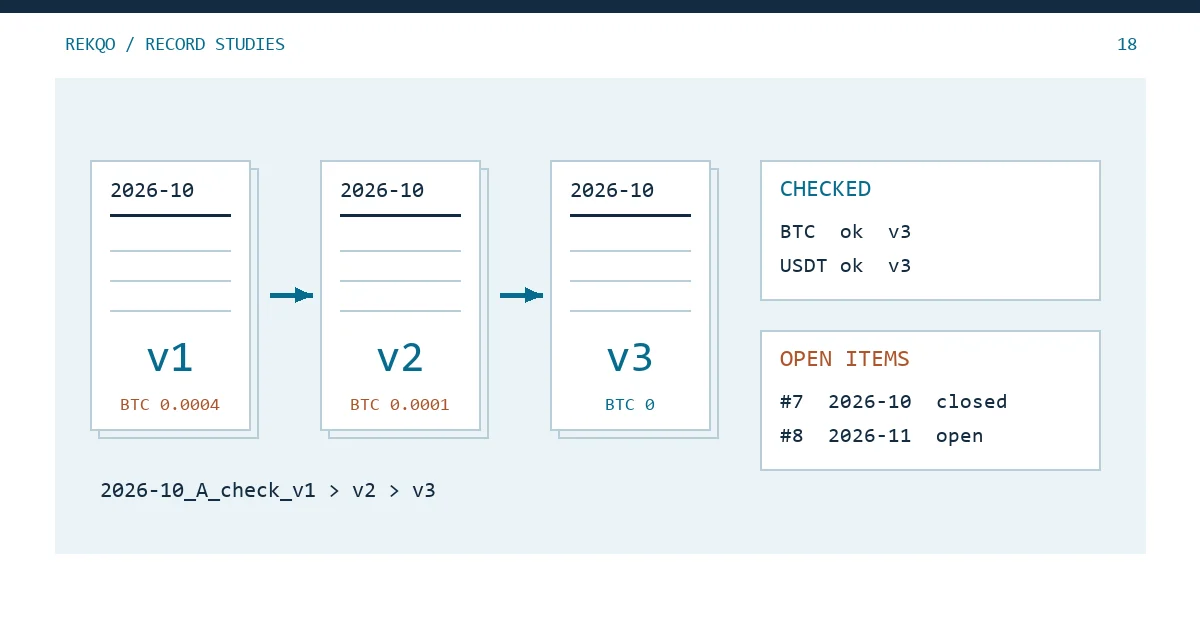
Worked example, not real data: suppose that in early November you reconcile October for an account you call A. The first pass leaves BTC 0.0004 short. On 3 November you export a conversion history you had missed and the gap drops to 0.0001. On the 5th you notice a transfer on 18 October filed under the wrong type, and the month balances. The folder now holds October recon.xlsx, October recon FINAL.xlsx and October recon FINAL 2.xlsx. Come January, nobody can say which file is the conclusion or where the 0.0004 went.
The fix is four habits. Put the month, an account alias, the stage and a version number in every file name. Never version the files you downloaded from the platform; record a fingerprint for each instead. Add one line to a change note every time the version goes up. And keep two lists, one for what is checked and one for what is still open, with every open item keeping the month it was raised in.
What goes in a reconciliation file name, and why “final” fails
A good name answers four questions before you open the file: which month, which account, which stage, which version.
Example: 2026-10_A_check_v1.xlsx · 2026-10_A_check_v2.xlsx · 2026-10_A_result_v3.pdf
Writing the month as 2026-10 means sorting by name is the same as sorting by date; “Oct” or “October” will sit next to next year’s October. Use an alias you made up for the account, never a UID or email address. File names show up in backup listings, chat attachments and sync notifications, where far more people can glance at them than will ever open the file.
“Final” has nowhere to go. The moment another missing record turns up you are writing “final 2” or “really final”, and the name stops telling you the order. A version number only moves up: after v3 comes v4, whichever one you thought was the last at the time.
Three stage words are enough: original, check, result. How to split those into folders is covered in Crypto Record Keeping: Build a Traceable Ledger; this note is about telling several files of the same kind apart.
Fingerprint the original exports instead of renaming or versioning them
An export is evidence, not a draft, so it never gets a v2. If you download the same month again, that is a second original. Keep both, and note in the index when each was obtained and which one the reconciliation used.
You cannot tell by looking whether an export has been altered since download. Open it in a spreadsheet, save it, and dates or long numbers may already be rewritten (Binance CSV Problems After Opening a Spreadsheet lists the usual ones). A fingerprint taken on the day of download lets you check at any time. In Windows PowerShell:
Get-FileHash .\original-export.csv
Microsoft’s reference page says Get-FileHash uses SHA256 by default, that changing even a single character of the content changes the hash, and that renaming the file or its extension does not. Copy the value into your index on download day; recompute later, and a match means the content is untouched. On macOS, shasum -a 256 followed by the file name in Terminal gives the same kind of SHA-256 value.
A matching hash only proves the file is identical to the one you saved. Whether that file was complete in the first place is still a job for the reconciliation.
When to bump the version: the conclusion changed, not the save count
Versioning on every save produces twenty files in a week that nobody will read. The test is whether the sheet’s conclusion changed. These count:
- you brought in a new original, such as a late conversion export or a rewards statement;
- you reclassified a row in a way that moves an asset’s inflows or outflows;
- the opening or closing quantity now rests on different evidence;
- a difference changed size, or an open item was closed.
Column widths, typo fixes and cell colours do not.
Each new version gets one line in a change note kept in the same folder:
Example: v2 · 2026-11-03 · added conversion history (downloaded 11-03, hash starts 3A9F07C2) · BTC difference 0.0004 → 0.0001 · #7 still open
v3 · 2026-11-05 · transfer on 10-18 moved from “outflow” to “internal move” · BTC difference 0.0001 → 0 · #7 closed
Keep v1. Without it you cannot show where the 0.0004 went.
A checked list and an open-items list
The fact most easily lost at month-end is what has been checked and what has not. Pile it all into a notes column and within a few months the notes are too long to show which ones are live. Split it.
The checked list has one row per account and asset: which file supports the opening figure, the net change and the closing figure; whether the result is “matches” or “difference explained”; which worksheet version it relies on.
The open-items list has one row per question, each with a number that is never reused:
Example: #7 · raised 2026-10 · account A · BTC · difference 0.0004 · checked so far: spot trade history, deposits and withdrawals · suspected: conversions missing from the spot file · next step: export conversion history · status: open
When the question is answered, do not delete the row. Mark it closed and add the date, the file that closed it and the version it was closed in. Delete it and the next time the same gap appears you will not know it has happened before.
“Checked so far” and “suspected” are separate columns so nobody repeats work. Whoever picks this up, including you in three months, can see which files are already ruled out.
Can this month be marked closed? Four conditions
- The checked list has a row for every asset in every account.
- Everything that did not match has a number on the open-items list. No difference lives only in your head.
- The index names every original used, each with its fingerprint.
- The result is saved in a format that is awkward to edit casually, such as PDF, with the same version number as the worksheet.
Condition 2 is the one people misread. Closed does not mean every difference is zero. A gap that is still unexplained but numbered and assigned a next step does not stop the month closing. The reverse also holds: if every number matches but you cannot say where the opening balance came from, the month is not closed. See Missing Opening Balance in Your Crypto Ledger? for that case.
Carrying unresolved differences into next month
The open-items list is one file for the whole ledger, not one per month. If #7 is still open when you close November, it stays #7 and its “raised 2026-10” column does not change.
Keeping the original month shows how long a question has been sitting. Three months with no progress is a sign to look for a different source of evidence, or to ask the platform for records, rather than reading the same files again. It also stops duplicate numbering: when November runs into the same gap, you can see it is #7 continuing.
A difference that first appears in November gets a new number, #8. If #8 turns out to be the same transaction as #7, close #8 with the note “merged into #7”.
Reopening a month you already closed
If December turns up a record October missed, do not open October’s v3 and type over it. Save a v4, write in the change note what was added, from which file, and how much it moves which asset, and produce a v4 result to match.
Then look at where November’s opening balance came from. If it was taken from a dated balance snapshot for the last day of October, adding an October record does not touch it and November stays as it is. If it was October’s calculated closing figure, changing October moves November’s starting point too, so recheck November and version it if needed. To locate when a difference began, use the method in Find the Day the Difference Started; the balance tool will work out the quantity gap at each checkpoint.
If a result has already gone to an accountant or a family member, add one more line to the change note: which version they received and when. When you send the new one, tell them which file it replaces.