If an original export imports successfully but a spreadsheet-saved copy fails, return to the untouched download. Repeatedly editing the only copy makes it harder to distinguish a file problem from a reading or formatting problem.
How can a spreadsheet change a file?
Spreadsheet software can interpret dates, numbers, and separators automatically, then write its interpretation when you save. A display convenience can become a change to the stored content.
Recap's Binance import guidance specifically warns that spreadsheet applications may reformat dates and values, and recommends trying the original download when an edited file fails. This does not mean every spreadsheet operation damages data; it means originals and processed copies need separate roles.
| Symptom | Check first |
|---|---|
| A whole row appears in one cell | Delimiter selection |
| Dates switch format | Automatic date interpretation |
| A long identifier ends in zeros | Numeric conversion and precision |
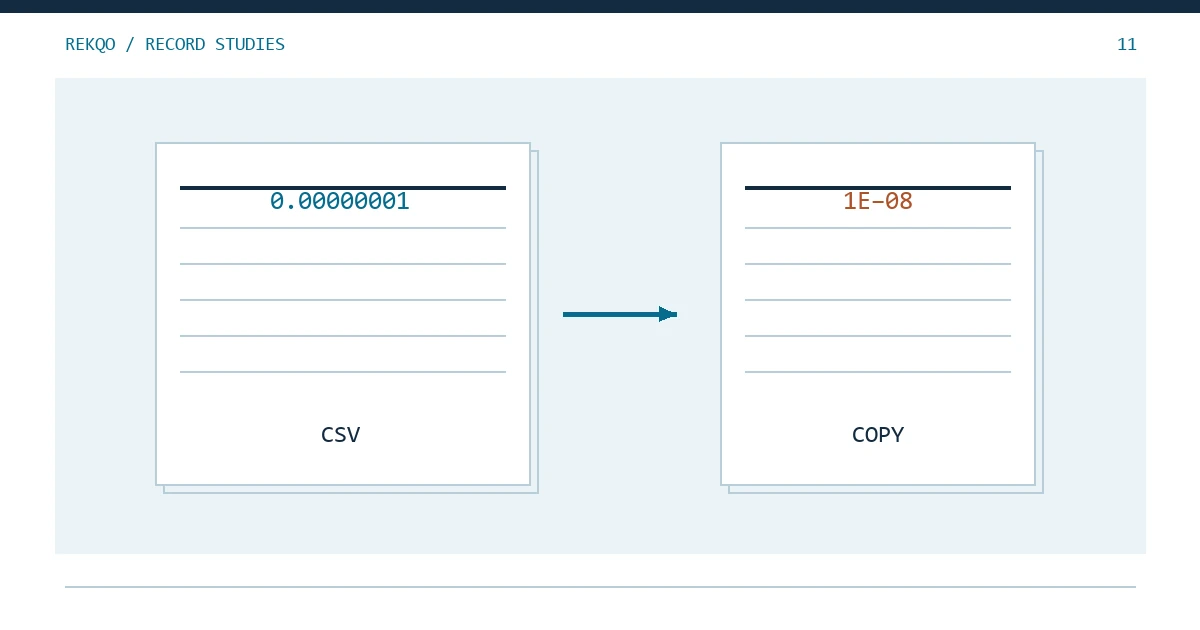
| A tiny quantity uses scientific notation | Display change versus stored-value change |
| Text is unreadable | Character encoding |
How should you protect the original?
Save the direct download in an originals folder and create a working copy. Record its name, retrieval date, and export scope. Perform filtering, notes, and conversions only on the copy.
Changing an extension does not convert a file into another format. Renaming columns also does not establish that their meanings match another tool's requirements. A quantity might mean a net asset change, an executed amount, or an order total.
If the original was overwritten, look for an untouched download, archive, or trusted backup. Otherwise, consider obtaining the same scope again through current official functions. Do not claim that rounded or replaced digits can always be recovered from the edited copy.
How should identifiers and quantities be read?
Identifiers, account references, and asset codes generally need explicit text handling. Quantities need deliberate numeric interpretation, with the original text retained for comparison.
A fictional identifier 001234 loses meaningful leading zeros if treated simply as the number 1234. Adding zeros later does not prove the original value has been restored. Long identifiers can also exceed the precision of a numeric representation.
For quantities, sample negative values, long decimals, and very small amounts. Scientific notation is a representation and does not by itself prove lost precision. Compare stored values with the original rather than judging only the visible cell. Avoid rounding every quantity for neatness before performing precise reconciliation.
How do you investigate encoding and column problems?
Use explicit text-import settings and inspect the preview. Confirm the encoding and delimiter before continuing with a badly aligned sheet.
Remarks may contain commas or line breaks that the file format handles through quoting. Splitting text at every visible comma can turn one remark into several columns and shift later asset or quantity fields. Use a reader that understands the actual format and inspect rows with complex remarks.
If one row appears to have extra fields, determine whether the issue comes from reading or the original structure. Preserve its original row reference. Deleting an untidy-looking row may remove a valid activity you need to reconcile.
How do you validate a processed copy?
Compare row counts, important field samples, and totals within each asset. Every change should have an intended explanation rather than merely an import-success message.
- Do row-count changes come from deliberate filters?
- Do dates near the period boundaries retain their meaning?
- Are identifiers, leading zeros, and minus signs preserved?
- Did decimal interpretation or rounding alter asset totals?
- Can converted fields still be traced to original values?
A readable presentation sheet can use convenient formatting while remaining separate from the import original. One hand-edited document does not need to perform both jobs.
What belongs in an import-error note?
Record the tool, file version, observed changes, error message, and attempted steps. “Original works; saved copy fails after date formatting” is a useful clue. “File broken” is not enough to reproduce the issue.
Before contacting support, confirm which Binance report type the tool supports. If a sample is necessary, share only appropriately redacted rows through a verified channel. REKQO does not need your real account file to explain these methods.
Once solved, preserve a short reading note covering encoding, text columns, quantity conversion, and which original file you used. Reuse that documented rule next month, while checking whether the export structure has changed.
Why can the same file look different on another computer?
Regional settings and software versions can change how decimal marks, grouping symbols, and dates are interpreted. Compare the original content before treating a different display as changed assets.
Do not blindly replace every comma or period: these characters may be delimiters, decimal marks, and ordinary remark text in the same file. Establish the quantity format, read it deliberately in a copy, then verify samples and totals.
When handing records over, include the reading note and original. The recipient should be able to recover the same quantities. Finally, test that your backup opens and that the working copy has not overwritten the evidence. A known save location is useful; a successful recovery check is stronger.