If a downloaded Binance file does not contain an activity you remember, check the report and its filters before requesting another copy. Generating the same report again will not fix a wrong account selection or turn a product-specific file into a complete account history.
This guide separates obtaining records from checking them. The platform steps refer to the official sources listed below; current menus, available ranges, quotas, and account eligibility may differ. The checking methods are local record-keeping techniques. All examples are fictional, and you do not need to upload account files to REKQO.
Define the export you actually need
Describe the task by period, account scope, and purpose. “All records” is ambiguous: all assets, all accounts, all activity types, and all historical dates are separate dimensions.
For example: “Explain August's asset changes in my main account's Spot and Funding wallets.” Then list the services you actually used during that period, such as conversions or rewards. That list helps identify supplementary sources. A single trading-pair report may suit a narrow trade question but cannot automatically explain every wallet balance.
Specify the opening and closing observation times as well. A current balance cannot be compared directly with a file ending two weeks ago unless you also explain the intervening activity. Where matching snapshots are unavailable, document the limitation and identify the extra records needed.
How do you use the website export?
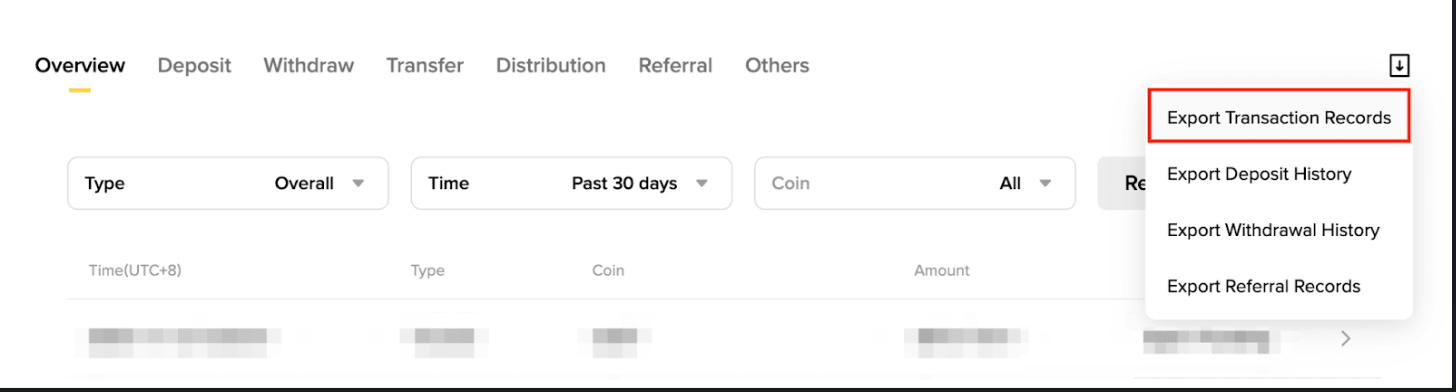
On the Binance website, open Assets → Asset History. Hover over the export icon and choose Export Transaction Records. This is the route shown in the official help page checked on September 13, 2026 (UTC); your account's menu may differ by region, account type, or version.
- Verify that you are using the genuine service and domain for your account.
- Open the relevant history area and read the current export description.
- Set the required dates and review account, sub-account, and asset options separately.
- Submit the request and record its status while it is being generated.
- Download the completed file and save the selected scope and retrieval date.
- Check the local result before merging or importing it.
These are checkpoints rather than a promise that every account has identical buttons or reports. If the page describes a particular product's order export, confirm that it answers your question. Do not use unfamiliar login pages merely because an old screenshot looks different from your account.
Check the current quota and date choices before submitting repeated requests. Binance's official help page, rechecked in October 2026, says download links expire after 7 days; go by what the page shows when you export. Save the completed file locally and open it; bookmarking its temporary address does not preserve the file.
Are app and website files equivalent?
Judge equivalence by content, not by the device or filename. Two files described as history may differ in accounts, products, fields, periods, or the meaning of each row.
If an app export contains product orders while you need changes across wallets, identify the appropriate additional source. Compare headers and sample records after download. An order summary and an asset movement file can both be spreadsheets without representing the same data.
When moving files between phone and computer, track versions. Identical filenames do not prove that they came from the same request. Check the transferred file before removing a readable copy. If a notification says a report is ready but you cannot find a local download, return to the official request history rather than trusting an unsolicited replacement attachment.
How should a long period be divided?
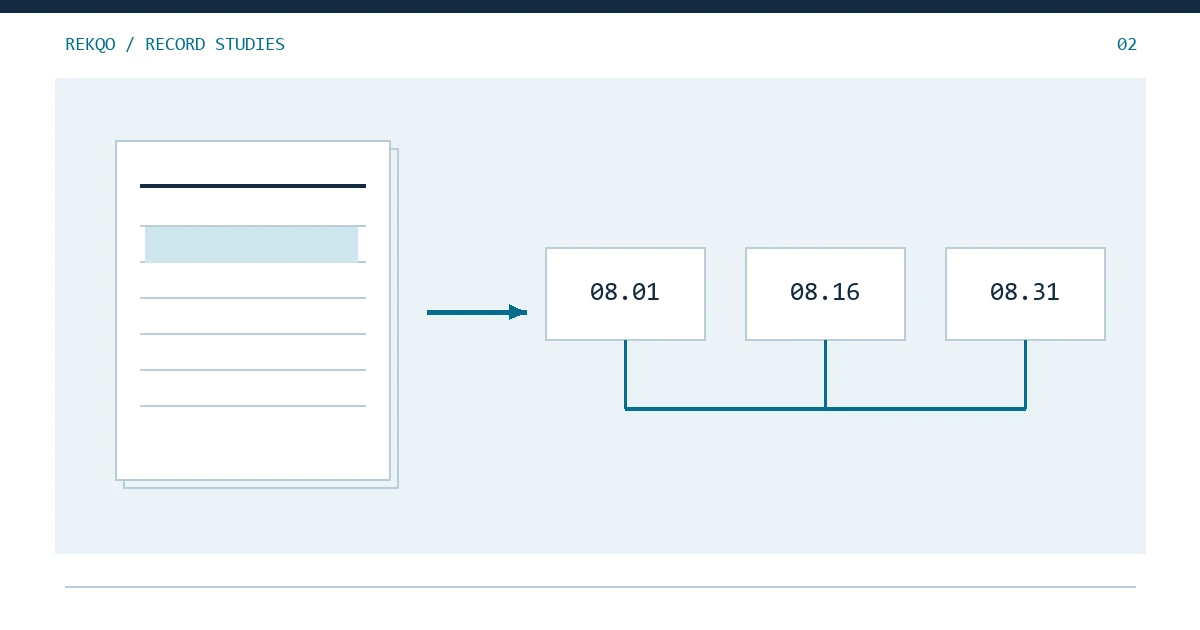
Draw the target period first, then split it according to the current export capability. Record each request's original filters and time zone. After downloading, inspect the actual records near every join.
| Part | Intended coverage | Check |
|---|---|---|
| First | August 1 at 00:00 up to August 16 at 00:00 | Opening boundary and known first activity |
| Second | August 16 at 00:00 up to September 1 at 00:00 | Join with the first file |
| Closing observation | The corresponding end boundary | Same scope and timing as the activity records |
For your local analysis, you can use intervals that include the start and exclude the end. Do not assume the platform's date picker uses the same convention. Some selectors accept dates rather than exact times. Verify the returned boundary records or current documentation.
The first record occurring after your chosen start is not automatically a gap; there may have been no earlier activity. Conversely, records appearing at both ends do not prove the middle is complete. Coverage also requires account checks, known-event samples, and quantity reconciliation.
What should you inspect immediately after download?
Check readability, scope, fields, samples, and version status before combining files. This separates retrieval problems from missing coverage or misunderstood data.
- Readability: confirm the download is complete and any archive opens correctly.
- Scope: compare accounts, assets, and activity categories with your request.
- Fields: understand the time, unit, direction, and quantity columns.
- Samples: locate several events you know belong in the report.
- Version: decide whether the file adds a period or revisits an existing one.
Work on a copy. Spreadsheet software can reinterpret dates and values, and a normal-looking display does not prove that the original text remains unchanged. Before editing headers to satisfy another tool, check which report format that tool supports and what the fields actually mean.
If a download contains multiple files, register each one. They may cover separate periods or record types. More files do not necessarily mean more coverage, especially when they are copies of the same data.
How can records be matched without a unique ID?
Use several features to locate candidates, while keeping the uncertainty visible. Time, account, asset, signed quantity, and activity type are useful clues, but their combination may not be globally unique.
If you know that 25 units moved from Funding to Spot on a particular day, search for the corresponding changes on both sides. If that amount moved twice, more evidence is needed to establish the correct pairing.
Orders, trades, and asset movements may have one-to-many relationships. One order can produce several relevant rows, so equal row counts are not a completeness requirement. First establish what a row represents, then compare the quantities and identifiers that should correspond.
Which known events make good samples?
Choose events from different times and actual activity categories, including boundaries. Do not check only the most recent successful trade.
| Sample | Expected evidence | If missing, first check |
|---|---|---|
| Early-month receipt | An increase in the appropriate asset | Start boundary and time zone |
| Internal movement | Opposite changes in the included wallets | Account selection |
| Conversion | Assets paid and received | Product coverage |
| Month-end fee | A separate fee or explained net change | Gross versus net treatment |
Passing samples increases confidence but does not certify every record. Follow with quantity checks. A failed sample should produce a specific investigation: wrong source, missing scope, or unclear field meaning. Appending many more files at that stage can introduce duplicates without solving the cause.
Screenshots can support a sample if they retain enough date, account, and status context. Keep complete private evidence separately from redacted copies used for support.
How does quantity reconciliation reveal gaps?
For one asset and scope, add the period's net movements to the opening quantity and compare with a matching closing observation. A difference means something remains unexplained; it does not identify the cause by itself.
Fictional example: opening quantity 100, inflows 30, outflows 12, and a separate fee of 1 produce an expected closing quantity of 117. If the actual closing quantity is 116, retain the difference and narrow the period. If the fee was already included in the 12-unit outflow, the expected result is instead 118.
A difference equal to a familiar fee or transfer is a clue, not permission to insert that explanation. Missing events can also offset each other, so matching balances do not prove correct classifications.
Start with quantities rather than a combined market value. Prices and conversion times add another layer of assumptions. Accounts involving debts or complex product equity also need their relevant records; a simple wallet formula does not explain every financial position.
How do overlaps and gaps need different treatment?
For overlaps, compare versions before using the data in your ledger. For gaps, obtain the missing scope or source. Reimporting everything is not a reliable solution to both.
If a full August file is already in your ledger and you later download the last three days for investigation, treat the new file as supplementary evidence first. If it reveals valid missing entries, document whether you replace the earlier version or add specific supported records.
When the missing scope is a wallet, shortening the dates without changing the wallet selection will produce the same problem. When the missing activity is a conversion, more spot trade files may not help. Define the actual missing dimension before requesting another export.
Retain originals and an exclusion log. A duplicate decision should be reversible when better evidence arrives.
How should a support request describe a gap?
State the required period, account or wallet, activity type, filters already used, and one or two missing examples. A precise scope question is easier to investigate than “I need all my data.”
A fictional request structure is: “I need this month's Funding wallet changes for a specific asset. I exported Asset History using the attached redacted filters. An activity is visible in the official account page, but I cannot locate a matching time and quantity in the original file. Which report should cover it?”
Save the support reference and answer in your private index. If a report does not cover an activity type, record that limitation while seeking the appropriate source. Never provide passwords or one-time codes as export troubleshooting material, and verify the support channel before sharing private records.
When is the export task complete?
Completion should mean the files are saved, scope is checked, samples are reviewed, and quantity differences have an explicit status. A report-generation success message covers only the platform's processing stage.
You can end a session with unresolved items, provided the status says so. “Spot and Funding checked; one reward source remains unconfirmed; external wallets excluded” is more accurate than an unlimited claim that all transactions are complete.
List the files used in your calculations alongside the result and distinguish unused supplementary versions. That stops you from later mistaking a file downloaded only for checking as new records still waiting to be added.
What if the interface or file format changes?
Preserve existing originals with their retrieval dates and scope notes. A menu change does not invalidate old evidence. A new export format should be compared by field meaning, rather than by column position alone.
In a working copy, note which old column matches which new column before combining old and new formats. Do not fabricate historical values for a field that did not previously exist. Separate interface changes from actual data corrections, because only the latter may alter earlier quantity results.
How should an empty file be checked?
Treat it as a result requiring explanation. It may mean no activity, wrong filters, the wrong report, or an incomplete download. An empty file cannot by itself prove that nothing happened.
Review the request settings and locate a known event that should belong to them. Check whether the file contains column headers but no rows, or an error message instead of records. If no activity is confirmed, record the basis in the scope register. Verified quiet periods contribute to coverage too.
Why retain an export index?
An index connects scattered files into a usable record chain. Include original name, activity period, source, account filters, time basis, retrieval date, and whether the file is used in your ledger.
It explains which of two similarly named files was used, which period must be requested again, and how to resume after changing computers or tools. As a final check, use only the index to find one sampled event and its reconciliation result. If that works, the documentation is doing its job.