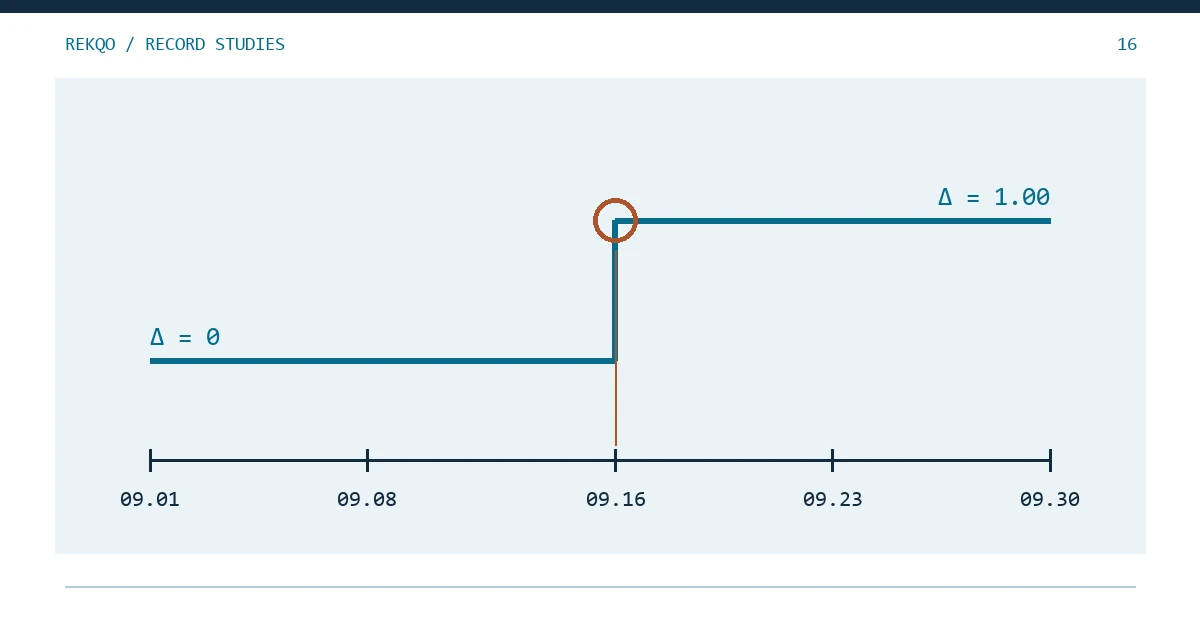
Worked example (simulated): account A holds USDT. On 1 September the ledger and the platform balance both read 500.00. On 30 September the ledger says 486.40 and the balance you saved at month-end says 485.40. One unit is not much, but September has forty-odd rows, and rereading them all is slow, and a second pass can easily skip the same row the first one did.
Instead of hunting for “the transaction”, hunt for the date. Once you know the first day the two figures part ways, you are usually looking at a handful of rows. Nothing here depends on a particular exchange or bookkeeping app; you need dated balance evidence, or a second record you can compare day by day.
Why not just search the ledger for the missing amount?
Searching for 1.00 only works if a single row caused the gap. A ledger can carry two or three small problems at once — an unrecorded fee here, a transfer entered twice there — and then the combined difference may match no row at all. No hit for 1.00 does not mean nothing is wrong.
Dates do not blur together like that. On the day the running difference first leaves zero, something happened that day. Find it, and you can match records inside one day rather than guess amounts across a month.
What two records do you need to trace a balance difference?
The first is a daily balance from your ledger: per asset, per account, start from the opening quantity and add each day's inflows, outflows and separately listed fees. The result is what your ledger believes you held at the end of each day. If several accounts share one sheet, split them by month-end account scope first, or transfers between them will create differences that are not real.
The second is a reference that comes from outside the ledger. Three kinds usually work:
- a balance screenshot or balance export you saved on a known date, with the date visible in the file name or on screen;
- opening and closing quantities from an account statement that covers a chosen period (how that differs from transaction history is covered in Statement or History);
- a separate platform record of balance changes that did not come from the same export file your ledger was built from.
Importing the same CSV twice and comparing it with itself is not a reference. Both copies will be wrong in exactly the same place.
Bookkeeping software calls this reconciliation: compare the ledger balance on a date with the statement's ending balance for that date until the difference reaches zero (see the GnuCash Guide section in the sources). The only change here is moving from one date at month-end to several dates inside the month.
Only have opening and closing balances? Narrow it down by halves
Say your only checkpoints are 1 September (matches) and 30 September (off by 1.00). Add references in between:
- Check 15 September. If the evidence for that day agrees with the ledger, the problem lies between the 16th and the 30th; if it disagrees, between the 1st and the 15th.
- Take the midpoint of the half that is left and compare again.
- Stop when one day remains: the day before agrees, this day does not.
In a 30-day month that takes five comparisons at most. Arithmetic is not the bottleneck — each comparison needs a reference balance for that exact date. With no mid-month snapshots, use the third kind of source above: total the platform's balance-change record per day and compare it with your ledger's daily net change.
| Date | Ledger net change | Platform record net change | Running difference (ledger − platform) |
|---|---|---|---|
| 09-14 | −20.00 | −20.00 | 0.00 |
| 09-15 | +35.00 | +35.00 | 0.00 |
| 09-16 | −12.50 | −13.50 | +1.00 |
| 09-17 | 0.00 | 0.00 | +1.00 |
The running difference leaves zero on the 16th and sits at +1.00 afterwards. Going back to that day's source rows, the ledger has a single 12.50 withdrawal, while the platform record shows an extra 1.00 deduction at the same moment. In this example it is a withdrawal fee. In a real account it could be another kind of deduction, so read the type field on that row rather than inferring it from the amount.
Label the difference column with its direction, “ledger − reference”. Positive means the ledger is too high, negative means too low. Flip the sign by accident and you will look for a cause that runs the wrong way.
Step, blip or creep: what the shape of the gap tells you
Plot the running difference by day and it tends to take one of three shapes, each pointing at a different kind of record.
A step that stays. The example above. One day something was recorded once too often or not at all, and every later day carries the same gap. Two possible causes to check first: a fee taken from a different asset while the ledger only tracked the main one (see Which Asset Paid Your Binance Fee?), or a conversion that lives in its own record and never reached the main file (see Convert Missing from Your Spot File?).
A blip that disappears. The gap shows up for a day or two, then goes away on its own. That pattern points less to a missing record than to the same record filed on different dates. Around month-end this can happen when one side stamps times in UTC, the other in local time (see CSV Dates a Day Apart?), or a transfer is entered on the day it left and appears on the other side only when it landed. It clears later — unless month-end falls inside the blip, in which case the closing balance still disagrees.
A creep that keeps growing. The gap builds up from a repeated small issue: fees on every fill left out, a spreadsheet trimming decimals so each row loses a little (see CSV Problems After Opening a Spreadsheet), or a type of small credit that never made it into the ledger. Halving only finds the first occurrence. After that, scan forward for the same record type recurring.
Blips can mislead the halving method. If your midpoint happens to land inside one, you will send yourself to the wrong half. Whenever a day disagrees, check the next day too, and keep going backwards only if the next day disagrees by the same amount.
Several assets or accounts off at once: trace them separately?
Yes, then bring the results back together. Each asset in each account gets its own running-difference line and its own first date.
Two lines jumping on the same day deserve a close look. USDT short and BTC over on one date, with quantities that match a trade, suggests one leg of that trade was never entered. The same asset going plus in one account and minus in another by the same amount can point to an internal transfer recorded on one side only, or on two different dates.
Do not add differences across assets. A 1.00 USDT gap and a 0.0001 BTC gap do not make a “total difference”; combining them only hides the dates.
What to write in your open-items list once you find the day
Leave the ledger alone for now. Give the day its own line in your open-items list:
- asset and account alias;
- the first date with a difference, and which file shows the day before agreeing;
- size and direction of the gap (ledger − reference);
- shape: step, blip or creep;
- the suspect rows on that day and the likely cause;
- status: to verify, cause confirmed, or entry added.
When the cause is confirmed, add the real record — that 1.00 withdrawal fee — not a 1.00 line labelled “adjustment”. The first can be traced later; the second just hides the gap. If the cause is still unknown, leave the item at “to verify” and note the affected asset and quantity next to the closing figures.
For the quantity check at each checkpoint, the per-asset balance tool on this site can do the arithmetic: enter the opening quantity, inflows, outflows and separate fees, then compare with that day's reference balance. It handles one date at a time; moving the checkpoint is up to you.
How to need fewer rounds next month
How fast you can narrow the range depends on how many dated reference points you have. A few saved balances inside the month mean fewer rounds next time — for example, one balance saved on the same weekday each week, named with the date and account alias and kept beside that month's exports.
A balance screen that only shows an estimated value in fiat, without per-asset quantities, will not work for this. Value moves with price, so it cannot tell you on which day a quantity went missing.