Before registering, confirm that your location and circumstances meet the platform's current requirements. Then check the referral field and displayed conditions. A referral code does not replace identity verification, grant product eligibility, or guarantee the same cashback rate for every activity.
REKQO is an independent information site, not Binance. We do not receive account passwords, identity documents, or funds. Crypto assets involve substantial risk, including losing all invested capital. Local rules and service restrictions vary; check the requirements that apply to you before proceeding.
Who is this checklist for?
It is for someone with a considered need for a personal account who has not completed registration and wants to review the conditions carefully.
Existing users should investigate their current account and referral relationship. This is not a guide to duplicate accounts or to a guaranteed change of referrer.
A language selector, accessible webpage, or displayed offer does not establish eligibility where you live. If the service presents a location or identity restriction, verify it rather than supplying false information or trying to bypass it. Personal and entity account choices should reflect the real purpose; this article does not guarantee registration, verification, or product approval.
What should be prepared?
Use contact details you control and genuine documents required by the applicable official process. Submit identity evidence only through verified Binance channels, never to REKQO or an unfamiliar helper.
| Item | Check |
|---|---|
| Eligibility | Current location and identity requirements understood |
| Contact method | Controlled by you and able to receive verification |
| Account type | Matches the actual purpose |
| Security | Unique credentials and suitable additional verification |
| Referral information | Expected code and conditions ready to inspect |
| Private records | A safe place for necessary confirmation notes |
A record index can contain the opening date and account alias, but not passwords, one-time codes, or recovery secrets.
How do you check the REKQO referral code?
The code provided here is BN6971. Check the referral field and association status during the actual process. A code appearing in a URL does not prove that an eligible relationship has been established.
Referral code: BN6971
This page contains a Binance referral link. REKQO may receive referral compensation if you register through it. Your cashback rate, product coverage, and eligibility depend on the actual registration and account conditions; no fixed rate is promised here.
Go to Binance to review and register
Check the destination domain after leaving this site. Do not trade unnecessarily for cashback; market losses can exceed any fee benefit.
If another sign-up route offers an editable referral field and the applicable rules permit it, enter the code there. A deposit memo, identity note, or unrelated form does not establish referral association.
The official registration guide describes the referral code being filled in automatically, with an indication that it is linked, for supported sign-up routes. Review the current interface before submitting, including exact characters and stray spaces. Do not assume that an incorrect choice can always be changed later.
What sequence of checks applies to registration?
Begin with eligibility and destination, then follow the platform's contact verification, account setup, and referral checks. Success at one stage does not complete every other stage.
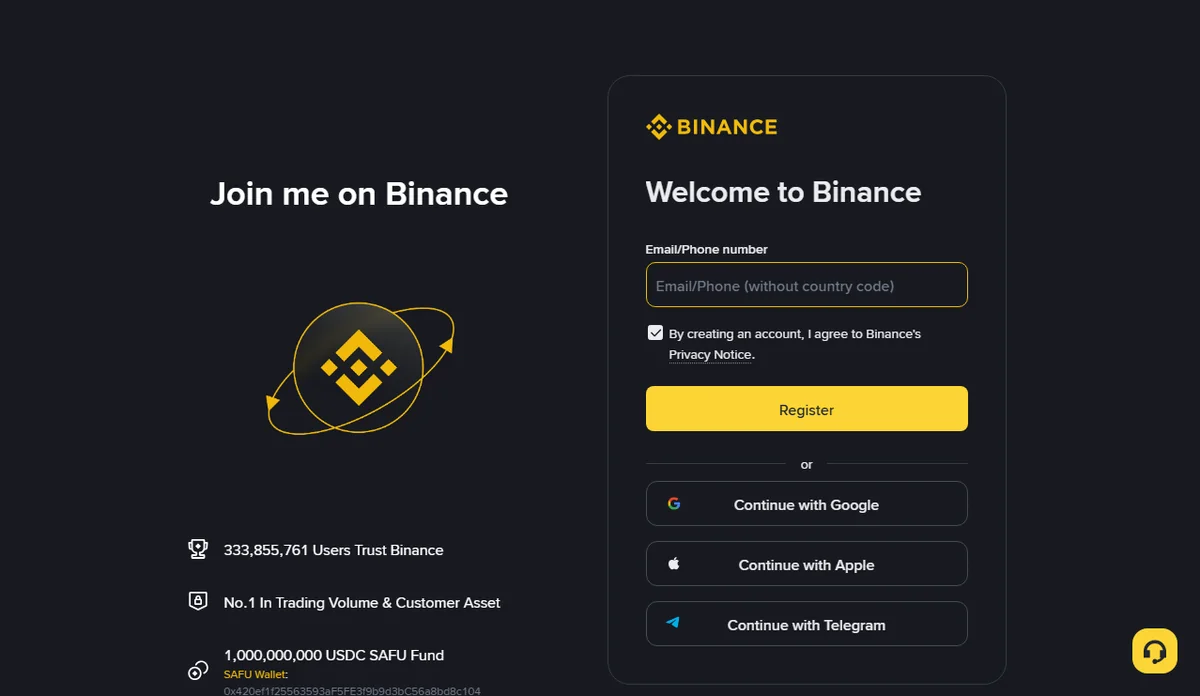
- Verify the domain, account type, and applicable location requirements.
- Start using a contact method or supported sign-in option you control.
- Read the current terms and privacy information before making choices.
- Complete requested verification and set suitable credentials in the official interface.
- Check referral information and retain necessary private confirmation notes.
- Continue with required identity checks and account security settings.
Menus and ordering may change. These checkpoints do not imitate an unchanging screen. If the interface differs, consult current official guidance rather than an unfamiliar “old registration” page.
Use verification messages only for requests you initiated. Do not share codes, and review the current prompt before repeatedly requesting new ones.
What matters during identity verification?
Provide genuine information belonging to you and rely on the actual review result. Account creation, referral association, and identity approval are distinct states.
Unclear documents, inconsistent information, or ineligible circumstances may require further action or prevent progress. Follow the actual instructions and official support process. Do not borrow identities, alter evidence, or pay someone promising approval.
REKQO does not handle verification documents. Your private checklist can record a status such as submitted or pending, without copying identity images into routine transaction worksheets.
Approval for an account also does not guarantee access to every product. Review additional requirements where they apply.
Which security tasks come first?
Protect sign-in and recovery channels before considering asset activity. Use unique credentials and the appropriate additional authentication offered by the account.
Never provide recovery secrets or one-time codes to someone claiming to help with rebates. Verify security messages through a known official entry point rather than an unexpected urgent link.
Review devices and unnecessary third-party access using the platform's available controls. REKQO's manual record tools do not need permission to control your exchange account.
What does “up to” mean?
It describes a conditional upper limit, not your verified personal rate. Mode, region, product, account status, and current rules can affect the outcome.
When we reopened the supplied link on October 16, 2026 (UTC), the registration page showed no specific cashback rate. REKQO does not promise any particular rate: whether cashback applies, how much, and to which products depends on Binance’s current official promotion terms and what your own account shows.
Do not confuse a referrer's commission with an invited user's cashback, or a one-time reward with ongoing treatment. Save conditions with their context rather than only the largest number. A fee benefit does not eliminate trading costs or market losses, and checking it does not require an immediate trade.
What if an existing account missed the code?
Check its current relationship and applicable official eligibility rules. REKQO does not promise that an existing account can add or replace a code.
The checked referral guidance describes a conditional association route for certain new accounts without an existing relationship, alongside restrictions on established relationships. Platform assessment determines whether an individual account qualifies.
For older accounts, Binance also describes an Affiliates Recall Program. The guidance checked on September 13, 2026 (UTC) requires no previous inviter, qualifying account age and inactivity, and an eligible affiliate. That program uses a qualifying invitation link; entering a code alone does not complete it. Check the rules and your account's prompts. REKQO has not established that BN6971 qualifies for recall on any particular existing account.
Do not close and reopen an account to obtain another relationship. Official material warns about referral eligibility consequences. Existing records and official support are the appropriate route for investigating a historical question.
How should a failure message be investigated?
Identify the stage and save the non-sensitive error text. Contact verification, identity review, referral association, and product eligibility require different checks.
| Symptom | First checks |
|---|---|
| No verification message | Correct contact, initiated request, current sending prompt |
| Code absent or invalid | Applicable sign-up route, exact field, existing relationship |
| Identity process cannot continue | Genuine information, required evidence, applicable eligibility |
| Account exists but product unavailable | Product-specific requirements |
| Expected cashback not visible | Actual mode, conditions, period, and account records |
Avoid endless identical submissions or false location changes. Ask official support when the meaning remains unclear, and supply only necessary information through a verified channel.
Which opening-day records are useful?
Keep the opening date, account alias, applicable reference information, referral observations, and security status. Store secret credentials separately.
Create an originals folder and a scope checklist for services you actually use. After genuine activity occurs, learn how to obtain relevant records and interpret their fields. There is no need to manufacture a test trade merely to populate an archive.
For later cashback checks, preserve actual asset, quantity, time, and source rather than booking an expected reward in advance. The rebate evidence guide explains that distinction.
Can the site still help if registration is unavailable?
Yes. General record methods and manual local calculations do not require an account at a particular exchange. They should not be used to bypass service restrictions.
Organize records you have lawfully obtained by account, time, and asset. Decide whether a financial service is suitable independently from a displayed code or language option.
How should a registration status note work?
Consider a fictional eligible reader. Before submitting, the note says “preparing; not registered.” Seeing the expected referral field changes the note to “field checked; process unfinished,” not “relationship confirmed.”
After switching from a browser to an app, the reader checks the current stage again rather than assuming previous information survived. An existing-account prompt calls for investigating prior registration, not trying more contact details to create duplicates.
Once the platform confirms account creation, record that result separately from identity status and referral confirmation. If association is unclear, mark it pending. The checklist does not need an identity number or password to preserve these distinctions.
How should screenshots be used?
A private conditions screenshot needs context, observation date, limitations, and enough information to identify the stage. A support copy should instead focus on the specific error and remove unrelated personal details.
Screenshots establish observations, not permanent guarantees. If later displays differ, retain both dates and ask which rules apply rather than editing the earlier image. A general explanation from support is not necessarily confirmation of your individual relationship.
When unsure what an image reveals, begin with a text description through the official channel. REKQO’s contact channel cannot verify account eligibility or cashback.
What is the final submission check?
Confirm genuine eligibility, correct destination, your own information, applicable referral fields, and current terms. Resolve material uncertainty before proceeding, then rely on the platform's actual results for identity, security, and product status.
REKQO supplies information and a disclosed referral link, not account approval or a rebate promise. Registration data belongs in the official process, while your private notes preserve what you actually checked.